
Enter each value with its weight, or paste two columns from a spreadsheet, to get the weighted mean, the sum of the weights and a step table that shows what each value adds.
Loading calculator…
A weighted average, also called a weighted mean, is an average where some values count more than others. This free weighted mean calculator is a weighted average calculator: it multiplies every value by its weight, adds the products and divides by the total weight. Next to the result it shows the ordinary mean, so you can see how much the weights change the answer.
It works as a weighted percentage calculator too: choose raw numbers such as credit hours, or percentages such as 20%, 30% and 50%. A bar chart shows which values drive the result.
How to use this weighted average calculator
- Enter the pairs. Type a value and its weight in each row, add a label if you like, and press Add row for more. Or open the second tab and paste a column of values and a column of weights copied out of Excel or Google Sheets.
- Choose the weight type. Use Raw numbers for credits, counts or prices. Use Percentages when the weights are shares such as 20%, 30% and 50%.
- Press Calculate. You get the weighted mean, the sum of the weights, the sum of value × weight, the simple mean for comparison, a working table and a contribution chart.
Each value needs exactly one weight. If the counts do not match, or the weights add up to zero, the calculator tells you instead of guessing. Entries that cannot be read as numbers are left out, and the calculator names them.
What is a weighted average (weighted mean)?
The meaning of a weighted average is simple: it is the average you use when the values are not equally important. Statisticians call it the weighted mean or weighted arithmetic mean. A final exam that is worth half the grade should move your average more than a quiz worth ten percent. Each value is given a weight that says how much it counts, and the weighted mean is pulled toward the values with the biggest weights.
Weighted mean and weighted average are the same thing. The ordinary mean is the special case in which every weight is 1. For that case, the mean calculator is the quicker tool.
Weighted average formula (weighted mean formula)
The weighted average equation is the same as the weighted mean formula. To calculate a weighted average, multiply every value by its weight, total the products, then divide that total by the weights’ sum:
x̄w = Σ(w × x) ÷ Σw = (w₁x₁ + w₂x₂ + … + wₙxₙ) ÷ (w₁ + w₂ + … + wₙ)
| Symbol | Meaning |
|---|---|
| x | A value, such as a score, a price or a rate |
| w | The weight of that value: credits, counts, a percentage or any positive number |
| Σ(w × x) | The sum of value × weight over all pairs |
| Σw | The sum of the weights, the divisor |
Only the ratio between weights matters. Weights of 2, 3 and 5 give exactly the same result as 20%, 30% and 50%, because the divisor rescales them. The tool divides by the real sum of the weights, so percentages that do not add up to 100 still give the correct mean.
Weighted average example: how to calculate it step by step
Take a course with homework worth 20%, a midterm worth 30% and a final exam worth 50%. The scores are 78, 84 and 90.
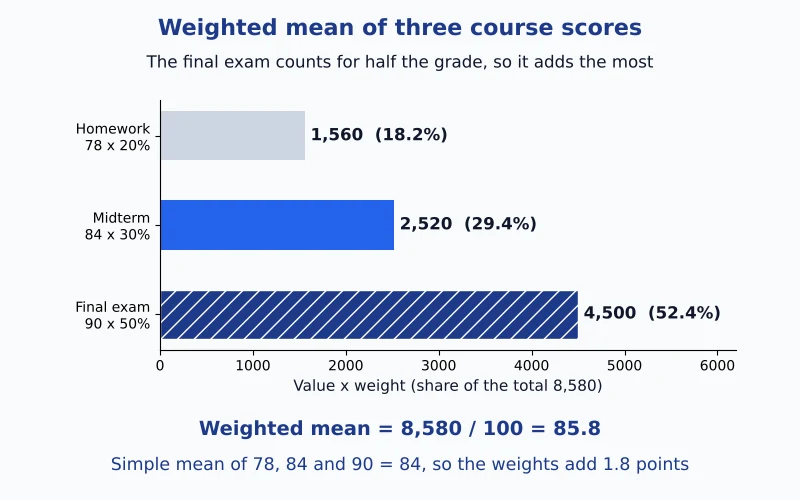
- Multiply each score by its weight: 78 × 20 = 1,560, 84 × 30 = 2,520 and 90 × 50 = 4,500.
- Add the products: 1,560 + 2,520 + 4,500 = 8,580.
- Add the weights: 20 + 30 + 50 = 100.
- Divide: 8,580 ÷ 100 = 85.8.
| Item | Value | Weight | Value × weight | Share of total |
|---|---|---|---|---|
| Homework | 78 | 20 | 1,560 | 18.2% |
| Midterm | 84 | 30 | 2,520 | 29.4% |
| Final exam | 90 | 50 | 4,500 | 52.4% |
| Total | – | 100 | 8,580 | 100% |
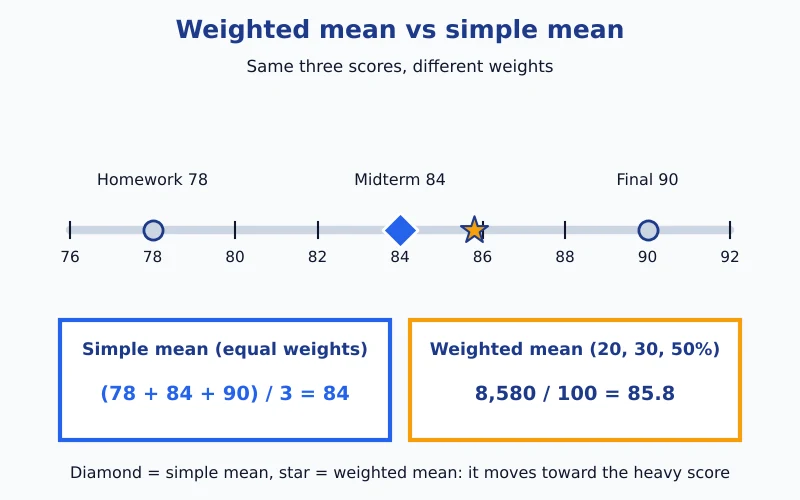
The plain mean of 78, 84 and 90 is 84, so the weights lift the result by 1.8 points because the highest score carries the most weight. The table under the calculator is laid out the same way, using your own numbers.
More weighted average examples: credits, prices and group sizes
Weights do not have to be percentages. If you scored 85 in a 4-credit course, 92 in a 3-credit course and 78 in another 4-credit course, the weights are the credits. The products are 340, 276 and 312, which add to 928, and 928 ÷ 11 credits = 84.3636. The simple mean of the three scores is 85, so the weighted result is a little lower, because the weakest score sits in a heavier course.
The same idea fixes the common average of averages mistake. Suppose 4 people average 70 and 16 people average 90. The plain average of 70 and 90 is 80, but the weighted mean using group sizes is (70 × 4 + 90 × 16) ÷ 20 = 86, which is the true overall average. Whenever groups differ in size, use the group sizes as weights.
Prices and quantities work the same way. If you bought 5 units at $12, 3 units at $15 and 2 units at $20, the weighted average cost per unit is (12 × 5 + 15 × 3 + 20 × 2) ÷ 10 = 145 ÷ 10 = $14.50, not the plain $15.67 you would get by averaging the three prices. Investors use the same step for portfolio returns: a fund that is 70% in a stock fund returning 12% and 30% in bonds returning 4% earns a weighted return of 9.6%, not the plain 8%.
Weighted percentages and weighted scores
A weighted percentage is a weight written as a share of 100, such as 20%, 30% and 50%. Entering percentage weights is the usual way to find a weighted score for a course or a survey: type each score, type its percent, choose Percentages, and the calculator divides by the total, which is 100 when the shares are complete.
- Complete shares. Percentages that add up to 100 are used as they are.
- Incomplete shares. If they add up to less or more, for example 50% and 30%, the calculator warns you and divides by 80. The answer equals the one you get after rescaling the shares to 62.5% and 37.5%.
- Percent values. When the values themselves are percentages, weight them by group size or credits, not by the percentages (see the 70% and 90% groups above).
This page does not convert letter grades to points or work out what you need on a final exam. It averages the numbers you give it.
Weighted mean vs simple mean
| Simple mean | Weighted mean | |
|---|---|---|
| Each value counts | Equally | According to its weight |
| Formula | Σx ÷ n | Σ(w × x) ÷ Σw |
| Use it for | Plain lists of numbers | Grades, credits, group averages, prices and quantities |
| Result lies | Between the smallest and largest value | Between the smallest and largest value, closer to heavy values |
This weighted mean calculator is for values with different weights. Need a median or a mode instead? The median and mode finder also accepts a frequency table. For the probability-weighted average of a random variable, see the expected value on the probability distribution calculator.
Weighted mean in Excel, Google Sheets and on a TI calculator
Spreadsheets have no built-in weighted average, but two functions together do the job. Keep the values in one column and the weights beside them. The calculator prints the formula with your own cell ranges below its results.
| Tool | How |
|---|---|
| Excel or Google Sheets | =SUMPRODUCT(A2:A5,B2:B5)/SUM(B2:B5) |
| TI-83 / TI-84 | Values in L1 and weights in L2; run 1-Var Stats using L1 as the list and L2 as the frequencies. The x̄ shown is the weighted mean. |
Excel has no single function called weighted average. SUMPRODUCT does the multiplying and adding, and SUM(B2:B5) supplies the total weight. On a TI calculator, weights act as frequencies, so keep them non-negative and, on older models, whole numbers.
Common mistakes with weighted averages
- Averaging averages. Use group sizes as weights instead of a plain average of the group means.
- Weights that do not match the values. Every value needs exactly one weight, in the same order.
- Dividing by the wrong total. Divide by the sum of the weights, not by the number of values.
- Mixing percent and raw weights. Keep one style per calculation, and let the calculator warn you when percentages do not add to 100.
To measure how far the values spread around their average, try our standard deviation calculator or the variance of the same data. Every tool that measures centre and spread sits in the descriptive statistics hub. Grading a class? The weighted grade calculator adds a letter grade, ungraded work and the score you need on the final.
Weighted average calculator FAQs
What is a weighted average, and what does it mean?
A weighted mean is an average in which some values count more than others. Each value is multiplied by its weight, the products are added, and the total is divided by the sum of the weights. For scores of 78, 84 and 90 with weights of 20%, 30% and 50%, the weighted mean is 8,580 ÷ 100 = 85.8.
Is a weighted mean the same as a weighted average?
Yes. Weighted mean, weighted average and weighted arithmetic mean are three names for the same calculation. Teachers say weighted average for grades, statisticians say weighted mean, and both use the formula Σ(w × x) ÷ Σw.
Why is my weighted average different from the regular average?
The regular average treats every value equally, while the weighted average lets heavier values pull the result toward them. If your highest scores sit in the most heavily weighted items, the weighted average is higher than the plain mean. If your lowest scores carry the most weight, it is lower. The two are equal only when all weights are equal.
How do I calculate a weighted average?
Multiply every value by its weight, total the products, then divide by the sum of the weights. With scores 85, 92 and 78 and credit weights 4, 3 and 4, the products are 340, 276 and 312, which add to 928. Divide by 11 credits to get 84.3636.
How do I calculate a weighted average of percentages?
Treat each percentage as a value and weight it by the size of its group, not by its own percent. If 4 people average 70% and 16 people average 90%, the weighted average is (70 × 4 + 90 × 16) ÷ 20 = 86%. Taking a plain average of 70 and 90 would give 80%, which ignores how many people are in each group.
Do the weights have to add up to 100%?
No. Weights can be any positive numbers, such as credit hours, counts or prices, because the formula divides by their total. If you choose percentage weights that add to 80 instead of 100, the calculator warns you and divides by 80, which gives the same answer as rescaling the weights to 100%.
What happens if all the weights are equal?
The weighted mean becomes the ordinary mean, because every value counts the same. The calculator shows a note when this happens. For plain averages, the arithmetic mean tool is quicker.
Can the weighted mean be higher than the biggest value?
No. With positive weights the weighted mean always lies between the smallest and the largest value. It moves toward the values that carry the most weight, which is why the star in the number-line picture above sits closer to 90 than the plain mean does.
How do I find a weighted average in Excel?
With the values in column A and the weights in column B, enter =SUMPRODUCT(A2:A5,B2:B5)/SUM(B2:B5). SUMPRODUCT multiplies each pair and adds the results, and SUM(B2:B5) is the total weight. Under the calculator’s results, the formula is written with your own cell ranges.
How do I find a weighted mean on a TI-83 or TI-84?
On the TI, key the data into the list editor: values go in L1 and their weights in L2. Open the CALC menu under STAT and run 1-Var Stats with L1 as the list and L2 as the frequency list. The x̄ it prints is the weighted mean. Some models reject decimal weights, so multiply all weights by 10 or 100 first if that happens.
How is a weighted mean different from the mean of the means?
The mean of the means gives every group the same importance, even if the groups have very different sizes. A weighted mean uses the group sizes as weights, so a large group counts for more. When groups differ in size, the weighted version is the correct overall average.
Can I use it for grades, GPA, investments or prices?
Yes, as long as you can write each item as a value and a weight. For a course grade, use the scores with their percent weights. For credit-weighted grade points, use the points with the credit hours. For a portfolio, use each return with its share of the money, and for average cost, use each price with its quantity. The tool does not convert letter grades into points.
Can weights be zero or negative?
A weight of zero simply leaves that value out. Negative weights are unusual and can push the result outside the range of the values, so the calculator shows a warning but still calculates. If all the weights add up to zero, the weighted mean is not defined and the calculator says so.
Easy Stat Calc · Results checked against Python, R and Excel · Last updated November 11, 2026 · Methodology